
About Aurva
Aurva is an enterprise database-security platform. It watches the databases a company runs on, controls who can touch them and stops problems before they turn into breaches. Most tools in this space only shout after something has already gone wrong. Aurva was built to do the opposite.
Product
Policies is the part of Aurva where security teams decide how data can be accessed. You pick the databases a rule covers, say who can reach them and under what conditions (query type, row count, table, sensitivity) and then choose what happens when the rule is met: block, mask or alert. It ships with a mobile Data Access Portal where any developer can check what they can reach, ask for more and get it the moment an admin says yes.
The core problem
Enterprise security tooling is powerful and painful. Products like Imperva, Cyral and Satori solve the plumbing but leave admins writing rules in technical consoles where the logic and its target drift apart. Three things kept surfacing in our early conversations, and all of them came down to the same root cause.
Passwords were being shared in Notes, Slack and Teams.
Access outlived the people who held it. Someone leaves, the credentials stay.
The approval flow was so slow that developers stopped using it.
When the safe path is also the slow path, people route around it. That was the real problem to solve, not the feature list.
Who I designed for
One product had to serve three people who think very differently. The CISO cares about the whole picture and cannot afford a leak. The security admin lacks a clear view of who is touching what and wants to get ahead of incidents instead of reacting to them. The data consumer (developers, analysts) just wants access fast, without doing anything that gets them in trouble.
Their mental models turned out to be the useful part. An admin reasons in a fixed order every single time: where is the data, who is touching it, what happens next. I used that sentence as the spine of the whole product.
Research
Along with the PM I interviewed across all three roles. We asked how access actually gets granted today, what each person counts as a vulnerability, what defines their security posture and where the current stack falls down. The interviews were also where the uncomfortable truths came out, like the shadow admin passwords people kept “just in case”.
Information architecture
I mapped the system to match how admins already reason, not how the database happens to be wired. The navigation splits into the estate (Sources), the people (Access) and the rules (Policies), which is the same where-who-what order from the interviews. Settings and utilities sit out of the way. The point was that an admin never has to translate their intent into the tool’s structure. The structure already talks back in their language.
How I approached it
My north star was easy to say and hard to build: turn complex security logic into a sentence a person can read. If an admin can think “alert me when a developer downloads more than 10,000 rows of Aadhaar data”, they should be able to build that exact line and see what it will do.
Two principles then ran through every screen. Scope before behaviour: settle who and where before the harder question of what happens. And make the secure path the fast one, because that is the only version people actually stay on. Most of the decisions below are just those two ideas applied.
Dashboard & DB Activity Monitoring
This is the where-is-the-data layer, aimed at the CISO’s fear of unknown access. The Overview opens on a plain read of the estate: how many sources are watched, how many are going dark, how many sensitive records are under scan and what fired recently.
Dashboard - Overview

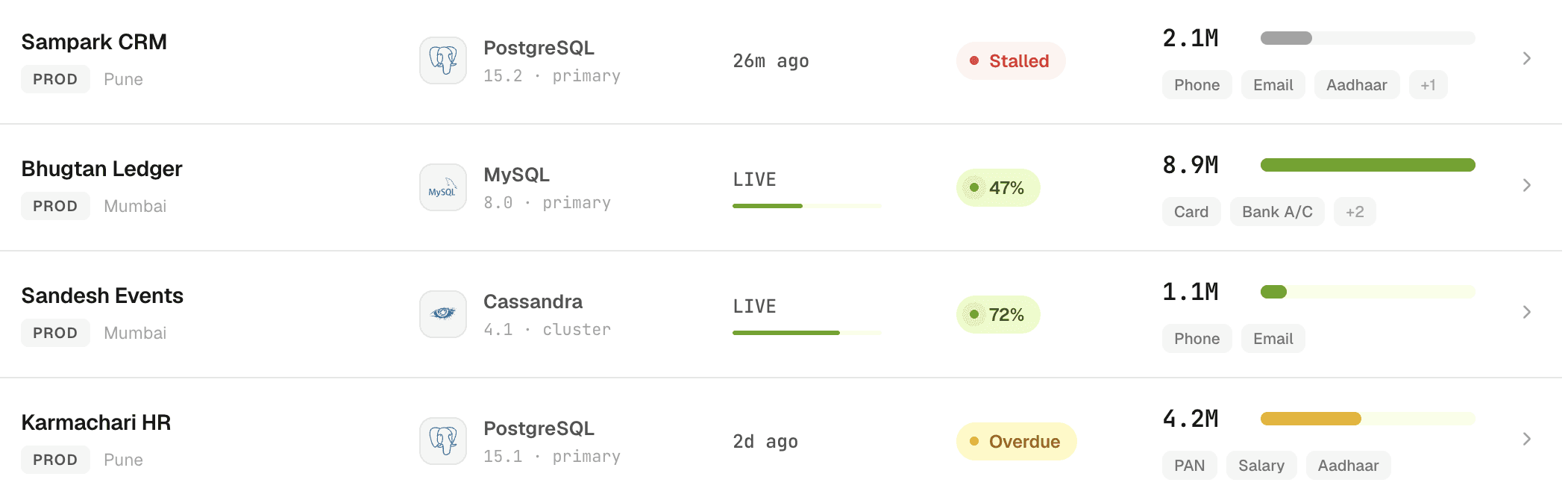
The Data Sources list shows every database with its engine, last scan and state, so a stalled scanner or an unwatched source is obvious at a glance instead of buried in a report.
Data Sources List
On the detail page I let density earn its place. For a single source like kuber-ledger-prod I pulled the composite risk score, the sensitive footprint, the actors reaching in and the controls that are on or off into one view. It answers the question a CISO actually has, which is not what happened but how exposed am I right now.
Data Sources Detail



Policy Creation Flow
This is the heart of the product and the part I iterated on most. The wizard opens by asking one thing: Access Control or Alert & Monitoring. I kept these as separate types on purpose. Access Control is a hard gate that changes what a user sees. Alerting only watches and notifies. Fold them into a single “then do X” list and you invite the fat-finger mistake where an admin means to watch a production service and blocks it instead.
Policy Creation Interface
Picking the type first also lets me strip every later step down to the options that apply. After that the wizard runs scope first: who it applies to, which sensitive data and which sources, with source groups so one rule can cover fifty databases at once. Only then does it ask when the rule triggers and what happens to the data. The piece that ties it all together is the live preview. As the admin builds, the rule renders as a sentence they can read aloud, beside an estimated reach: how many rows and users it touches, roughly how many queries a day it will catch. They are not configuring an abstract rule. They are writing a line and watching its blast radius move.
Policies List
Data Access Portal - Mobile App
The broken approval flow was really a transparency problem, so I designed the portal as the developer-facing half of every policy. Each database is a card showing exactly where the person stands. Active grants carry a live countdown, which makes access feel like a session they are managing rather than a wall, and quietly reminds them it expires. Everything else shows a clear request or cancel state, plus engine and region so nobody asks for prod when they meant dev.
My Access


The hard call here was the break-glass override. A DevOps lead told me that at 2am with production down he needs the real data, not a masked value, and that without a legitimate way to get it, teams keep shadow passwords for exactly those moments. So I built an override toggle and made it deliberately heavy: off by default, a written reason required, on-call security paged, time-boxed and shown as a bold True or False at the top of the approver’s screen. A quiet bypass becomes an audited event. The developer gets speed, the CISO gets the visibility they were missing.
Browse Databases & Request Access
Security Incidents
An alert is noise until an admin can see intent, so I built this as contextual forensics. The list leads with what needs attention and sorts by urgency, not time. The detail page has to answer one question fast: power user doing their job, or genuine breach.
All Incidents & Incidents Detail
I surfaced the three things that separate a legitimate employee and a malicious breach:
Rows accessed is the quickest read on risk, since two rows is a bug fix and two million is exfiltration.
Semantic types matter more than table names, because knowing someone touched Aadhaar or PAN changes the severity.
And the raw SQL sits at the bottom as the deciding evidence: a tight WHERE clause reads very differently from a SELECT that dumps the table to a file.
Since the admin needs to act, remediation lives on the same page. They can freeze the account or set up an ACL without ever leaving the incident.


Design system
A product this dense only stays readable if its language never wobbles. I built a system covering type, colour, iconography, data-density rules and, most usefully, a shared status vocabulary for severity, risk and grant state. A “high” risk or an “active” grant looks and reads the same whether you are in Sources, Incidents or the mobile portal.
Results
The design took the most demanding job in the product, deciding how data can be touched, and made it something an admin can read, build and trust in plain language. By making the safe path the fast one, it goes after the password-sharing and broken-approval habits at the source, instead of alerting on them after the damage is done.